Screens
Tokenwright
See how tokens connect: what each one points at, what points at it, and what a change would reach. Also where a theme’s modes are set up.
What it’s for
Most tokens point at other tokens. A button’s background points at the brand colour, which points at a green from the palette. Tokenwright draws those links, so you can see where a value really comes from, and everything that would change if you changed it.
Flow, Hierarchy and Outline
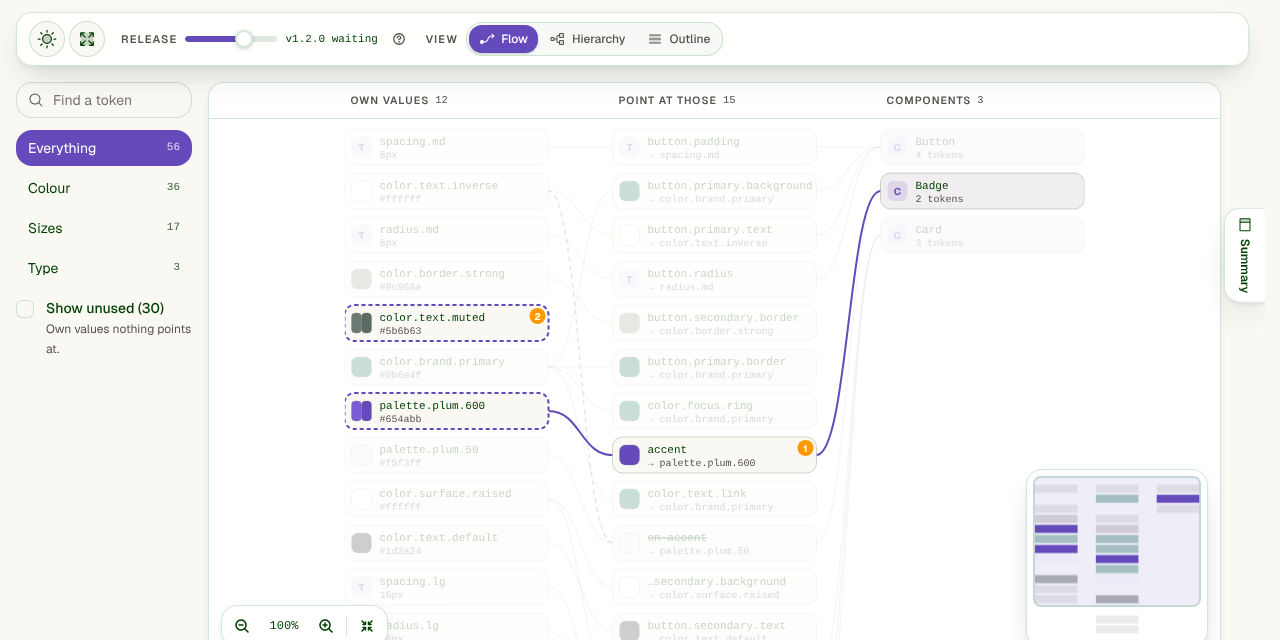
- Flow
- Columns from left to right: the raw values, the tokens that point at them, and the components that use those. Hover a token to light up its whole chain; click to keep it lit.
- Hierarchy
- The same tokens as nested blocks, grouped by name. Click a block to zoom into it. Good for seeing the shape of a set.
- Outline
- A plain list, easiest with a keyboard or a screen reader.
Narrow the view with the search box, or by kind (Colour, Sizes, Type, Other). Show unused adds tokens with their own value that nothing points at, which are often safe to remove.
Mode and Release
- Mode shows every value as it is in that mode, such as dark. Press M to flip through them.
- Release slides to any version of the theme, or to the one waiting for review, and highlights what that release changes and everything the change reaches. It’s the quickest way to see how far a small change goes.
A token up close
Click a token to see it in the panel: its value in the current mode, its description, what it points at, and what points at it (tokens and components). Open in Tokens takes you to edit it.
Comments under it is the token’s conversation. Use it to ask why a value is what it is, or to suggest a change. Follow a thread to be told about replies.
With nothing selected, Deprecations in the panel lists deprecated tokens and what still points at them.
Setting up modes
Modes are how one theme has light and dark (or compact and comfortable) values. Editors set them up with Modes at the top of Tokenwright.
- Add an axis: a group of modes that switch together, such as
schemeordensity. - Add its modes, such as
lightanddark. Make default picks the one used when nothing else is chosen. - For each mode, say what each token set does: enabled (on in this mode), disabled (off), source (its tokens can be pointed at, but aren’t output themselves), or inherit (as the theme has it).
Tip: A common setup: a light set and a dark set with the same token names. In the light mode, enable light and disable dark; in the dark mode, the other way round. Every token that points at them now has both values.
Good to know: Delete axis and Delete mode remove them from the theme. Releases already published keep the values they had.
Keyboard
- ↑ ↓
- Move within a column
- ← →
- Follow a link back or forward
- Enter
- Select (pin the chain)
- Esc
- Clear the selection
- + −
- Zoom in or out (or ⌘/Ctrl + scroll)
- 0
- Fit every column
- F
- Centre the selection
- M
- Flip the first mode (e.g. light and dark)
Looking for the API, CLI or AI agents? They’re in the developer docs.